

AmoyShare DiReec Screen Recorder: Record Screen and Audio Free
julio 17, 2024 | by Equipo YKCG

Índice del Articulo
AmoyShare DiReec Screen Recorder: The Definitive Tool for Recording Your Screen
In today's world, thescreen recordingIt has become a need for both professionals and enthusiasts. Whether you need to record a presentation, a tutorial, a game of video games or an online meeting, AmoyShare DiReec Screen Recorder is the ideal tool that will provide you with everything you need to capture your screen with ease and high quality. Below, we will explore the features and benefits of this powerful screen recording tool.
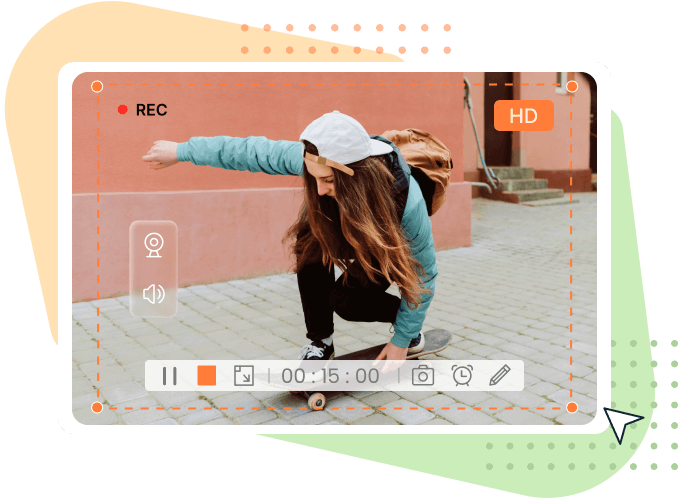
Record Screen, Audio and Webcam Simultaneously
Screenshot Any Part of the Screen Without Delays
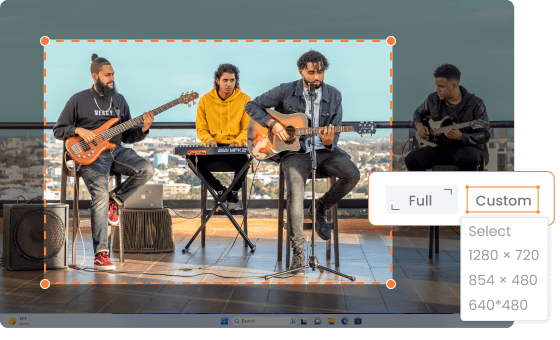
With AmoyShare DiReec Screen Recorder,you can capture any part of your screenwithout any delay. The tool is highly compatible with various screen sizes, allowing you to choose between recording the full screen, a specific area or custom sizes such as 1280x720 or 854x480. This flexibility ensures a seamless recording experience.
Record Internal Audio and Voice Simultaneously
DiReec Screen Recorder not only captures the screen, but also records the internal audio of your computer and your voice. This is perfect for creating explanatory videos, tutorials and much more. In addition, with advanced noise reduction and sound effects function, you can get the best audio quality on your recordings.
Unlimited Webcam Recording
In addition to recording the screen of your computer, DiReec Screen Recorder allows you to capture your face using the internal or external camera. This is ideal for online meetings, presentations or any business work. You can adjust the shape, size or frame of the webcam during recording, adapting it to your specific needs.
Take Screenshots Before or During the Recording
Are you worried about losing any important details during the recording? Don’t worry. With DiReec Screen Recorder, you can take screenshots at any time, either before or during the recording. This assures you that you won’t forget any important details and that all key moments will be saved on your device.
Record Scheduled Screen at Any Moment
Program Screen Recording
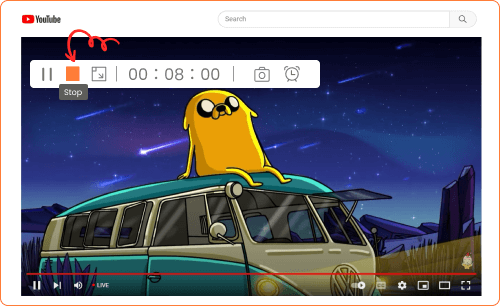
DiReec Screen Recorder allows you to schedule screen recording according to your needs. You can set the time and duration of recording, and the tool will automatically start recording at the right time. In addition, you can set the recording to stop automatically during the process, giving you unparalleled flexibility.
Draw or Highlight During Recordings
If you need to highlight or write down specific areas of your recording, DiReec Screen Recorder provides you with a set of real-time annotation tools. With arrows, circles and other elements, you can make your recordings more attractive and easy to understand for viewers.
Applications in Different Sectors
Educational purposes
Screen recorders are essential tools in the education sector. Teachers and educators can record video lessons, tutorials and presentations that students can review at any time. This improves learning outcomes and allows students of all ages to benefit from high-quality educational content.
Enhancing Partnerships
In the business arena, online meetings and remote collaboration are becoming more common. With DiReec Screen Recorder, you can record important meetings, presentations and discussions, and save all the detailed information on your device. This allows you to review the content later or share it with your colleagues.
Recording of Games and Live Transmission
For gamers, a screen recorder is an indispensable tool. You can record and stream your games live, capturing your experiences and strategies. This not only allows you to review and improve your performance, but you can also share your achievements on streaming platforms.
Presentations and Demonstrations
Professionals and technicians can use DiReec Screen Recorder to demonstrate the use and functionality of software and products. By capturing your screen, you can create informative recordings that help a wider audience understand and learn about different topics.
Advanced Features of Best Screen Recording Software
Versatile Export Formats
DiReec Screen Recorder offers a wide range of export formats for videos, audios and images, adapting to your specific needs.
Recording Without Watermark
All your recordings will be clean, without intrusive watermarks, offering the best viewing experience.
Friendly Interface
The software features an easy-to-use interface, allowing users at all levels to use it without complications.
Efficient Cutting Function
Removes unwanted sections and maintains the desired recording length with the cropping tool, without complications.
Ability to Highlight the Cursor
DiReec Screen Recorder allows you to highlight the cursor, showing striking effects on the mouse, such as the click area and the cursor color.
Customizable Keyboard Shortcuts
Simplify the screen recording process with customizable keyboard shortcuts to record, pause, resume and more.
High Quality Recording Output
Capture your screen, video or audio with the original high resolution quality, or improve the clarity of screen recording.
Conversion from Audio to Text
The screen recorder allows you to transcribe spoken words or audio from the system to text, facilitating the recreation of recordings.
Hardware Acceleration Support
Improve your user experience with more fluid performance thanks to hardware acceleration technology.
Get AmoyShare DiReec Screen Recorder Free
Get the ultimate tool to record your screen for free. Follow the steps below to activate your 6 month license:
Regular Product Price:$27.50 USD $0.00 USDduring the promotion.
Terms and conditions:
- 6 month license for 1 PC
- Non-commercial use
- Free updates for 6 months
- Free technical support
- Sign up before this offer ends

RELATED POSTS
View all


Advanced SystemCare 18 PRO Free License Full
enero 18, 2026 | by Equipo YKCG
DVDFab Blu-ray Ripper: Full License for 1 Year Free
noviembre 27, 2022 | by Equipo YKCG
What is DVDFab Blu-ray Ripper and how does it work?
enero 5, 2025 | by Equipo YKCG