

Advanced SystemCare Ultimate 18: Is this official promotion worth it in 2026?
febrero 19, 2026 | by Equipo YKCG
Índice del Articulo
Advanced SystemCare Ultimate 18: honest guide + review (and official promotion) for Windows
Advanced SystemCare Ultimate 18 combinescleaning/optimizationwith a layer ofsecurityfor Windows. In this guide I explain what it really does, what it doesn’t do, and how to use it without “breaking” your system by touching aggressive settings.
Updated:18/02/2026
Who's it for?Users ofWindows 10/11(PC and laptops) they wantimprove maintenance(cleansing, booting, privacy) and have aantimalware layerwithout relying on “miracle promises”.
1) What you do and what you DO NOT (very honest)
What's he doing?
- Optimization and cleaning:helps remove time traces, clean non-essential items and suggest performance/privacy adjustments.
- Boot management:allows you to review programs that load at the start to reduce boot time (if used carefully).
- Security:integrates anti-malware/threat scan functions (the scope depends on your configuration and system status).
- Control panel:centralizes typical “maintenance” tasks in one place.
What doesn't he do?
- It does not fix hardware problems (SSD/HDD failing, faulty RAM, overheating) or replace a real diagnosis.
- It does not guarantee more FPS in games if the bottleneck is GPU/CPU/driver. A driver approach and system settings are usually more useful for this.
- It is not appropriate to “apply everything” without reviewing: some aggressive settings may break programs or system preferences.
If your PC is slowing down by outdated drivers or drivers, it is usually best to review specialized tools such asDriver Booster Probefore touching advanced system settings.
2) How to use it correctly (clear and safe steps)
- Download from reliable source:use the download link indicated in the promotion (see “Official Promotion”) or the official IObit website.
- First scan with conservative mode:run an initial analysis and review results before applying automatic corrections.
- Prioritizes the safe:Clearing of clearly obsolete time, caches and inputs. Avoid deleting “blind” elements from the system.
- Active protection with criteria:if you already use another security suite, avoid duplicating “real-time” modules to prevent conflicts.
- Saves a restore point:before applying “deep optimizations”, it creates a restoration point (especially in work equipment).
Practical tip:If you are doing complete maintenance, it combines with a dedicated uninstaller to avoid waste:IObit Uninstaller PRO.
3) Recommended configuration (by scenarios / hardware)
If your priority is “suite” maintenance but with a different focus, compare also withWise Care 365to see what fits your way of using the PC.
4) Expected results (without promising miracles)
- Expectable:less temporary trash, lighter boot (if clean startups), and more “ordained” system feeling.
- For safety:useful detection/scanning as an additional layer, but actual protection depends on habits (downloads, mail, browser extensions).
- Don't wait:duplicate performance, fix serious system failures or “make new” a damaged disk.
Simple rule:if your Windows is slow, first remove the obvious (starter, temporary programs) and then adjust the advanced. This guide helps you with the “no programs” part:speed up Windows 11 without programs.
(5) Requirements and compatibility
- System:Windows 10 / Windows 11.
- Type of equipment:PC and laptops.
- Internet:recommended for updates and verification.
- Coexistence:if you already have main antivirus, avoid duplicating protection in real time to not generate conflicts.
Official reference:see details and functions on the product page:IObit Advanced SystemCare Ultimate.
6) Official promotion (if applicable): activation and conditions
Download / promotion: Go to the promotion page
Important: some licenses haverestriction by regionandquota. If a code has already reached its limit, it may not activate even if it is “existing”.
How to activate (clear steps)
- Download and installAdvanced SystemCare Ultimate 18 from the promotion link.
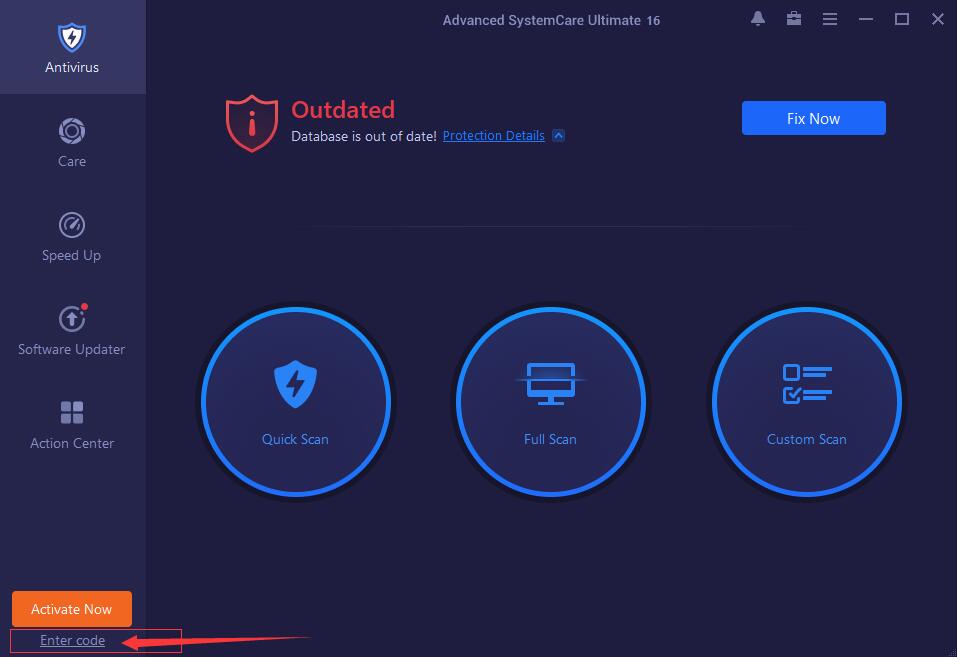
- Open the program and enterEnable/Enter code.
- Hit thecodeand confirms.
- If the program requests it,restart the app(or PC) to apply activation.
Steps to Get License
- Download and installthe program on your team.
- Open the program and clickActivate / Enter code.
- Copy andpastes a codefrom the bottom table and confirms.
- Restart the appif the system requests it to apply the changes.
Activation Codes Available
If activation fails:try another code, check your region, and make sure you are using version 18.x. It is also convenient to restart the app before retrying.
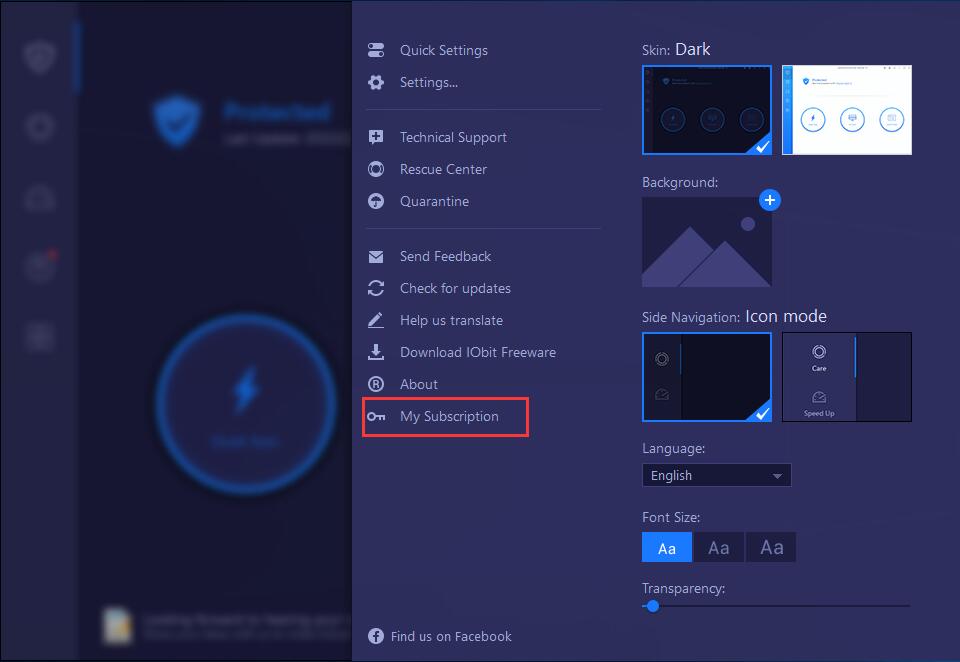
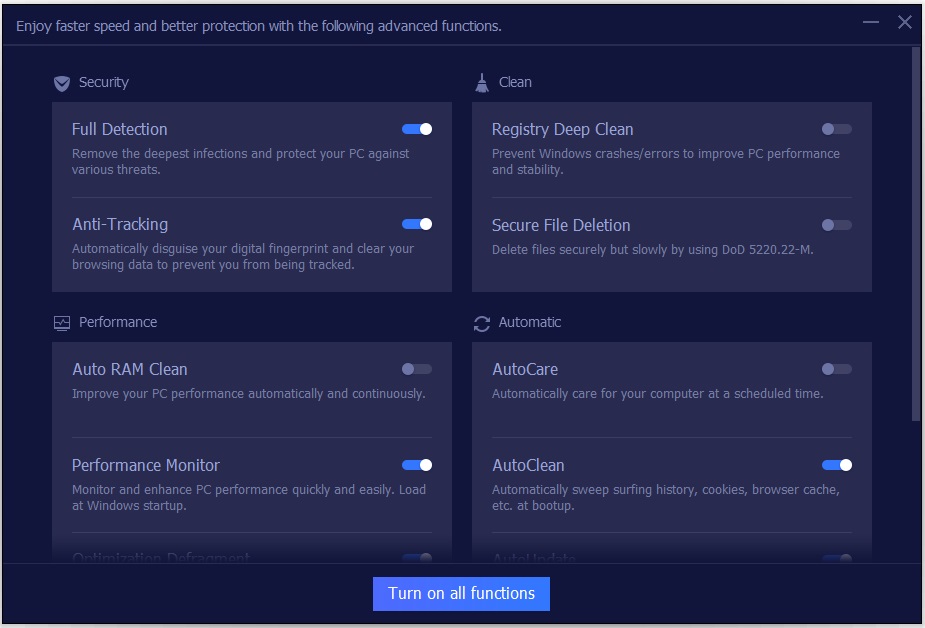
Useful official captures (visual guide)
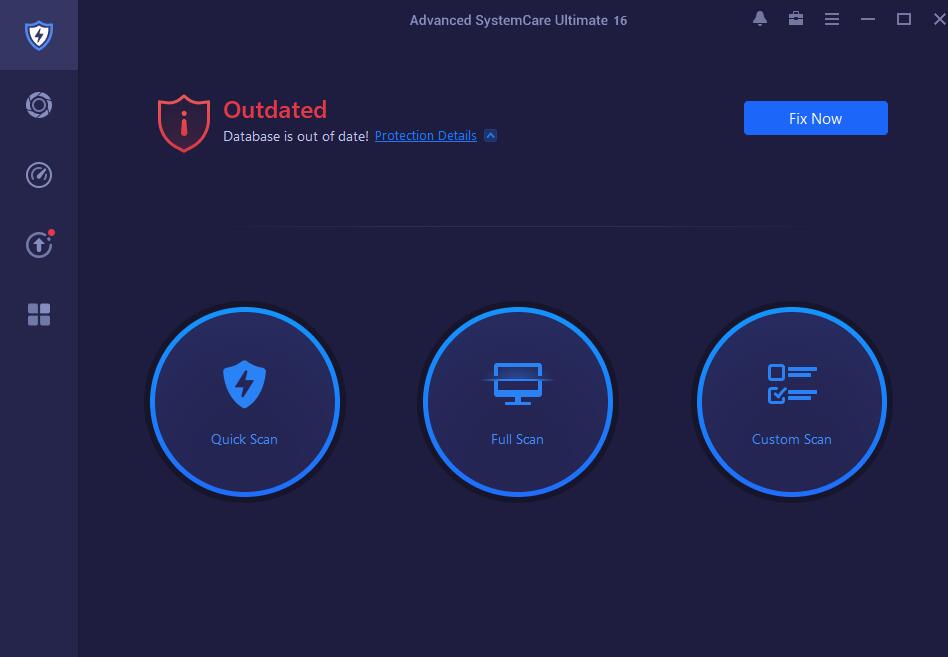
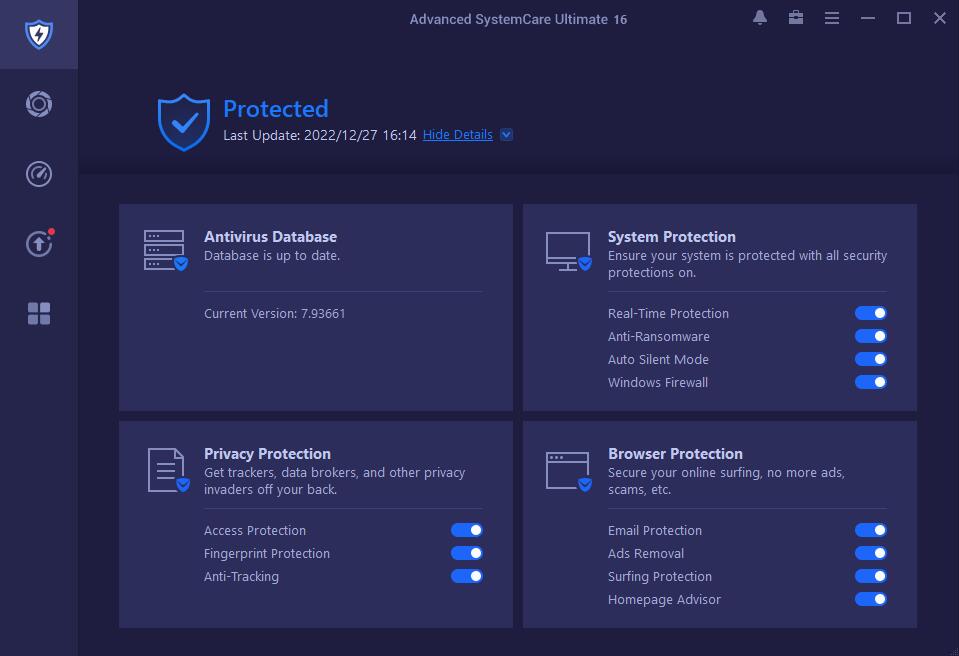
Verified conditions (summary)
- Valid until the dates indicated (no automatic extension).
- Includes free updates within the version18.xduring the period of validity.
- Personal/domestic (non-commercial) use.
- Limited availability byquotaoregion.
- Do not redistribute, resell or publish keys on third-party sites.
- Some licenses haveregional restriction(only active in certain countries).
- The licenses have user limits; when they reach them, they can no longer be activated or reactivated.
(7) Alternatives and when other
1) Advanced SystemCare Pro (optimization without “Ultimate” approach)
If your priority is maintenance/optimization with more “light” licenses and focus, compare to:Advanced SystemCare Pro 19.
2) Wise Care 365 (general maintenance)
If you are looking for a maintenance option with another style of tools and panel, check:Wise Care 365.
3) Driver Booster (if the problem is drivers)
When the stutter, errors or performance come from controllers, it usually suits:Driver Booster Pro.
4) IObit Uninstaller (if the problem is waste / bloat)
To uninstall well and avoid accumulated garbage:IObit Uninstaller PRO.
8) FAQ (common questions with search intention)
Advanced SystemCare Ultimate 18 is antivirus or optimizer?
It's a combination: it includes functions ofmaintenance/optimizationand a module ofsecurity. Do not treat it as “miracle”, use it as a maintenance suite with antimalware layer.
Can I use it together with Microsoft Defender or another suite?
Yes, but carefully: avoid duplicating simultaneous “real-time” protections. If you already have master suite, use it more for maintenance and spot scanning.
What adjustments should I NOT touch if I am not expert?
Aggressive system changes, unrevised “deep cleaning”, and any options that affect essential services. On work equipment, it prioritizes conservative mode + restoration point.
Why can a promotion code fail even if it is in force?
Forregional restrictionor because it reached theactivation limitIn that case, try another code and check your region.
Is it convenient to speed up games or upload FPS?
It can help reduce “noise” (start, process, time), but does not replace real optimization (drivers, graphic settings). If your goal is performance, check drivers and base settings first.
What alternative to choose if I just want optimization without security modules?
You can consider maintenance/optimization-centered options and compare with your flow. It is also valid to apply “manual” improvements to Windows without installing anything.
How do I verify that it was activated?
In the subscription/license panel within the program (as in the “My Subscription” screenshot). If it is not active, restart the app and review the code and region.
9) Recommended internal links
To complete your maintenance and improve stability without complicating yourself, here are some related resources:
10) Editorial Transparency Note + Legal Disclaimer
Editorial transparency (affiliation):Some download/buy links in this article may beAffiliate linksIf you decide to use them, we may receive a commission at no extra cost to you. This helps maintain the site and continue publishing guides and promotions.
Disclaimer:Conditions, availability, validity, quotas and restrictions by region may change by decision of the provider. Always check the official page before installing or activating. Complete keys are not published here to respect terms of use; use codes only from authorized official sources.
Join our Telegram to not miss promotions
That's where I'm warning you.official promotions, limited time licenses and quick guides to install/activate securely. If you like to save time looking, it will serve you.
What you'll find
- New Promos Alerts
- Reminders before they're done
- Tips for Safe Activation
Note: We always share official links and recommend checking conditions and dates on the provider's website.
RELATED POSTS
View all

Wise Care 365 PRO: Windows maintenance, real and alternative advantages
febrero 9, 2026 | by Equipo YKCG
Ashampoo Uninstaller 15 Free: Download and Full Official License
abril 23, 2026 | by Equipo YKCG

Driver Booster PRO 13: Official 2026 License and Activation Guide
julio 15, 2026 | by Equipo YKCG