

Protect Your Business with AOMEI Cyber Backup: Reliable Enterprise Backup and Recovery Solution
abril 15, 2025 | by Equipo YKCG
An organization's data, generated and stored over time, plays an important role in the proper functioning of the business. However, today, multiple factors can cause data loss. For example, cyber-attacks, hardware failures, and natural disasters can pose a threat to data, so effective backup and recovery solutions are essential to avoid data, downtime, and disruption to business operations.
Índice del Articulo
Why AOMEI Cyber Backup Stands Out
AOMEI Cyber Backup is a professional enterprisefree backup tooland recovery software, which focuses on easy server backup, ensurring business continuity and provide multiple backup types:
•Virtual Machine Backup:For organizations using virtual environments, AOMEI Cyber Backup provides backup of virtual machines in VMware and Hyper-V.
-System Backup:Helps you protect your entire operating system and ensure fast data recovery even after a system crash.
-File-level Backup:You can choose to back up specific files or folders for a more granular backup.
-Disk Backup:Backup of disks and partitions ensures that does not data is missed.
Cloud Backup:It backs up data to the cloud, providing off-site protection and disaster recovery.
It can automatically start backup tasks based on user-set periods without reviewing manual operations. It also provides the flexibility to back up data to external USB devices, network-shared files, or the cloud, which facilitates unified management and access to data in a multi-device network environment for businesses or families.
In addition to some of the features mentioned above, AOMEI Cyber Backup offers you the following features:
Use-Friendly Backup:Equipped with an intuitive web console for backup and restare of all virtual machines. Backup administrators can easily handle data protection jogs without a long learning curve.
•Agentless Backup:Creates image-based backups of entire virtual machines without the need to install an agent on each virtual machine, increasing the efficiency of the backup deployment process.
•Comprehensive Compatibility:It is compatible with various Windows operating systems, such as Windows 11, 10, 8, and 7.
Centralized Backup:It integrates with vCenter Server, making it easy to add all virtual machines for centralized backup management.
Simple Steps to Backup and Recovery
You can choose the method as well as the type of backup according to your needs. Although the following takes VMware ESXi VM backup as an example, you can configure Hyper-V backup, Microsoft SQL Backup, disk backup, partition backup, system backup, and file backup.
Step 1. Bind Devices
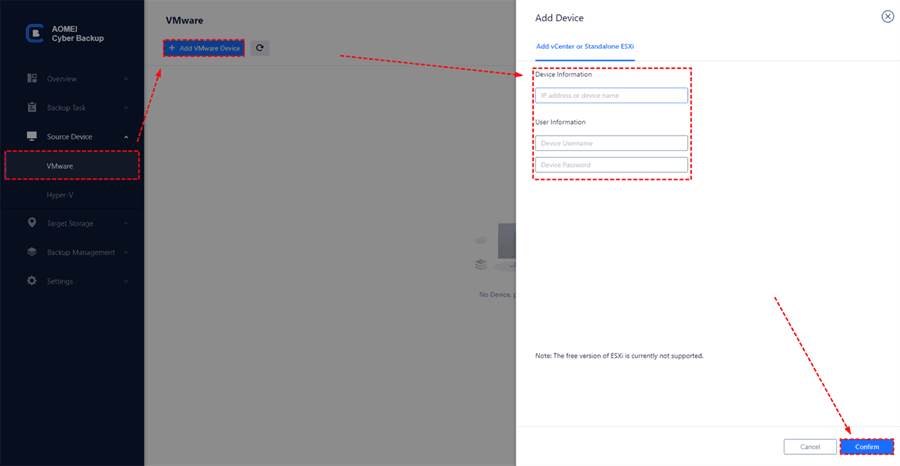
Log in to the AOMEI Cyber Backup web client, navigate toSource Device>VMware>+ Add VMware Devicetoadd vCenter or Standalone ESXihost as the source device. EnterDevice InformationandUser Information, then clickConfirm.
Step 2. Create Backup Tasks
Navigate toBackup Type>+ Create New Task, and select theBackup Type(VMware ESXi Backup, Hyper-V Backup, Microsoft SQL Backup, Disk Backup, Partition Backup, and System Backup), here we takeVMware ESXi Backupas theBackup Type.
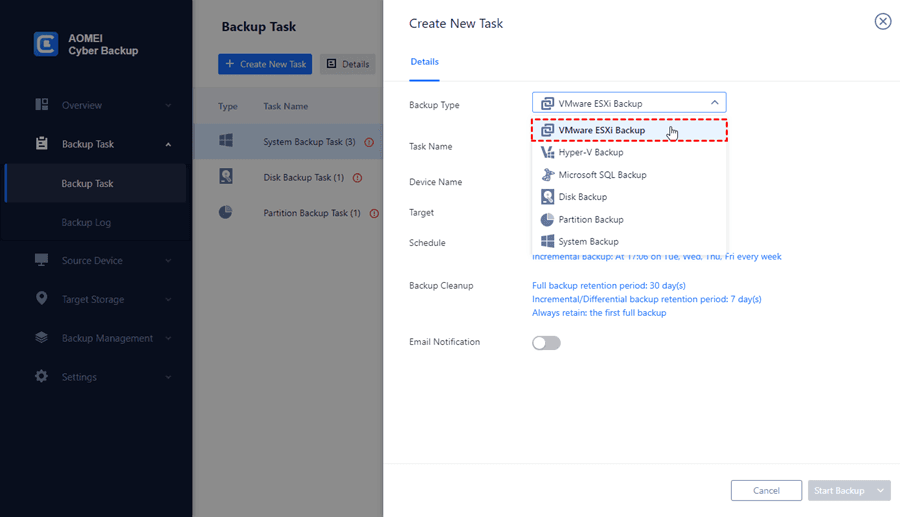
- Device:Select the VMs on the host you want to backup.
- Target:You can select to local path, or to a network path. Used paths will be saved in Favorite Storage for hand selection.
- Archive:You can enable archive backup versions to Amazon S3, and select to choose the added Amazon S3.
- Schedule:You can choose to perform a full, differential, or incremental scheduled backup, and automate execution according to the frequency you specified.
Step 3. Start Backup
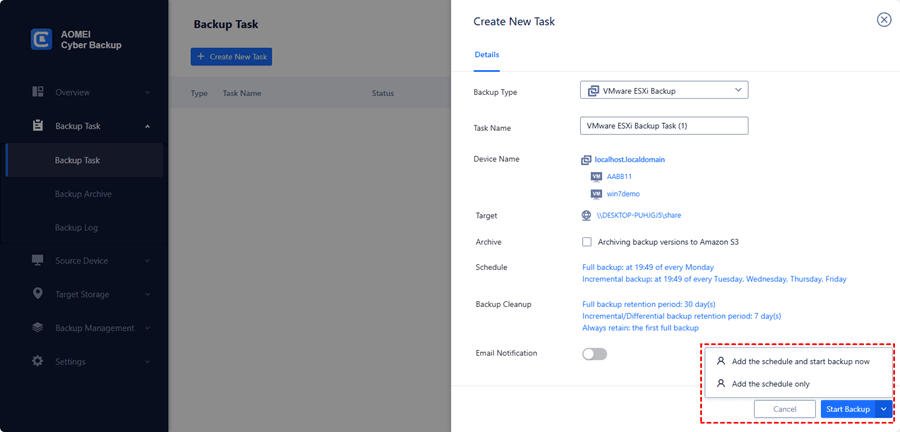
ClickStart Backupand selectAdd the schedule and start backup now, orAdd the schedule only.
Step 4. Perform Recovery
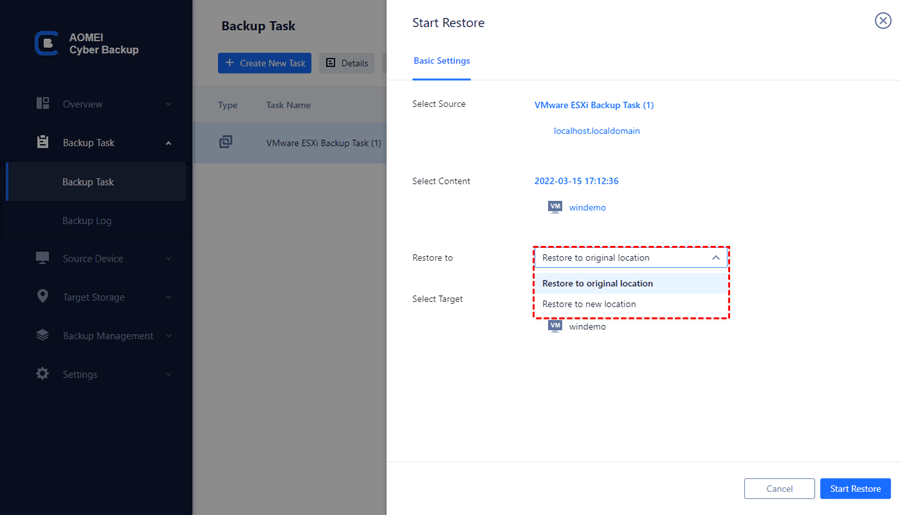
Navigate toBackup Taskto find the task you want to recover. Click...>Restore. Select toRestore to original location, and clickStart Restore.
Frequently Asked Questions (FAQs)
1) Is AOMEI Cyber Backup free?
Yes, AOMEI Cyber Backup offers free and upgraded versions. While the free version covers most of the VM backup needs, you can also upgrade to enjoy more features, likebatch VM backup,backup cleanup, andrestare to new location.
2) Can AOMEI Cyber Backup recover VM to another host?
Yes, VMs under Hyper-V host A can be recovered under Hyper-V host B. VMs under ESXi host A can be recovered under ESXi host B. However, VMs under Hyper-V hosts cannot be recovered under ESXi hosts, which are different platforms and do not support cross-platform recovery operations.
3) Can AOMEI Cyber Backup restare a database to another instance or SQL Server?
A: A lower version database can be restored to a higher version database, a higher version database cannot be restored to a lower version database, a database under instance A can be restored to instance B.
Conclusion
If you are looking for anenterprise backup and recoverytool, you may want to try AOMEI Cyber Backup, which can provide you with many types of backups as well as backup and recovery solutions.
RELATED POSTS
View all

Steganos Data Safe: Safe Encryption for PC, Network and Cloud
mayo 20, 2023 | by Equipo YKCG
SecureAnywhere AntiVirus 8211; Real-time protection 8211; 2021
enero 2, 2022 | by Equipo YKCG
TogetherShare Data Recovery Pro: Recover Your Data
junio 26, 2023 | by Equipo YKCG