YKCG

How to Detect Damaged Sectors on Windows with Macrorit Disk Scanner

enero 22, 2026 | by Equipo YKCG

macrorit disk scanner professional edition
.ykcg-article { --bg: #ffffff; --surface: #f7f9fc; --surface-2: #ffffff; --border: #e6ebf2; --text: #1f2937; --muted: #5b6475; --accent: #2563eb; --accent-2: #0ea5e9; --success: #16a34a; --warning: #f59e0b; font-size: 16px; line-height: 1.75; colour: var(--text; background: transparent; max-width: 100%; } .ykcg-article* { box-sizing: border-box; } .ykcgg-article colour: { max-width: 100%; hehe: auto; display: block; } .ykkcg-article-articticing; { { { { box-box-boxboxboxbox . . . . kkkkkkkkkkkkcg-aticing-article ; ; ; ; ; ; ffkkkkkkkkkcggg ; ; ; ; ; ; ff[open]sump:after { content: "="; } .ykcg-faq .ykcg-faq-body { mark-top: 8px; colour: var(-muted); .ykcg-inline-links { display: flex; flex-wrap: wrap; gap: 10px; margin-top: 10px; } .ykcg-inline-links a { display: inline-flex; align-items: centre; gap: 8px; padding: 9px 12px; border: 1px solid var(-border); border-radius: 999px; background: var(--branch-branch); color: var(text; text-text; text-dec; text-decation: none; font-weight: 700; } .ykcg-inline-link-links a:hover; {pxpxpxpxpx; background: {-network: {-network; background:
Life license (domestic use) · Macrorit Disk Scanner Pro (v7.1.0)

Macrorit Disk Scanner Professional Edition: detects damaged sectors and looks after your disk before it fails

If your PC is slow, errors appear when copying files or listening to strange noises on the disk, the smartest thing ischeck the health of HDD/SSDas soon as possible.Macrorit Disk Scanner Professional Editionyou can scan units and locatedefective blocksto prevent data loss and plan a backup on time.

Ideal for:Quick  diagnosisof disks with failures, slowness or reading errors
Recommendation: backupif the scan shows damaged sectors or abnormal times
What is Macrorit Disk Scanner Pro and what is it for?

Macrorit Disk Scanner Professional Editionis a diagnostic tool that analyzes your hard drive (HDD) or solid state drive (SSD) to identifydefective sectorsand areas with slow or unstable reading. Your goal is to help youdetect physical or logical problemsbefore they become serious failures.

Actual use cases (where appropriate)

  • Slow PCwhen opening folders or programs(possible irregular reading of the disc)
  • Files that do not copyor get corrupted(read/write errors)
  • Screenings or rebootswhen loading Windows(problem sectors in the system)
  • Disk with noisesor abnormal behavior(physical wear sign in HDD)
  • Before selling or buyinga used PC(quick storage review)

What problems help prevent?

  • Loss of photos, documents and projects (when detecting failure on time)
  • Unexpected formatting (when the system stops booting due to disk damage)
  • Recurrent Errors in Windows (slow reading or unstable sectors)
  • Overall poor performance (areas with high response times)

Quick tip: if the scan detects errors, the most important thing is not “fixing the disk”, butback up your dataand consider replacement if failures increase.

Main functions and benefits

Designed for a clear diagnosis, Macrorit Disk Scanner Pro offers a visual and understandable scan, ideal if you are looking for a lightweight tool to check the condition of the disk.

Benefits for home users

  • Detection of damaged sectors to make decisions before losing information
  • Scan by area if you only want to check a specific section of the disk
  • Easy to interpret results with a map/scan status
  • Useful for preventive maintenance on PCs of work, school or gaming

Good best practices

  • Back up before and after if you detect problem areas
  • Check the disk for reading errors or hang up when opening folders
  • Monitor with periodic scans if your disk already has a history of failures
  • Avoid heavy loads if the disk is unstable (better migrate to a new one)

Official captures of the software

Here are official images for the reader to identify the interface and understand the scan flow.

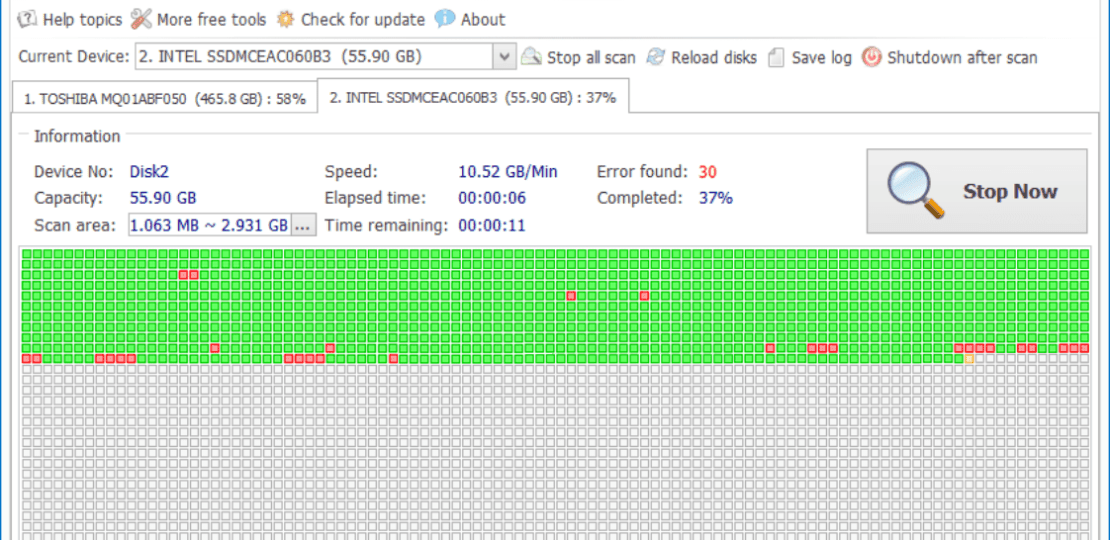
Macrorit Disk Scanner Professional Edition Escaneando Todos Los Discos Y Mostrando El Progreso
Scanning of all units: useful for a complete diagnosis.
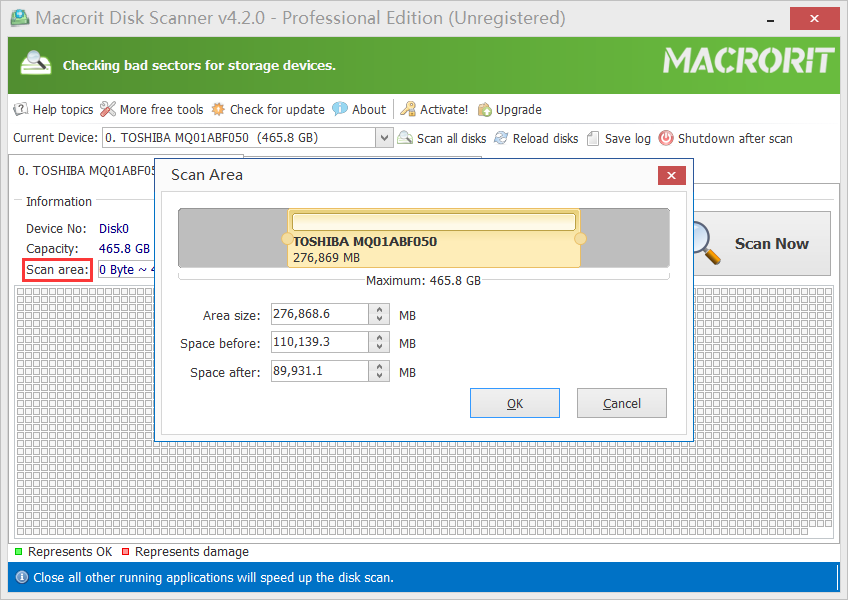
Macrorit Disk Scanner Pro Función De Escanear Un Área Específica Del Disco Para Detectar Sectores Defectuosos
Scan by area: Check specific areas of the disk when you suspect failures.
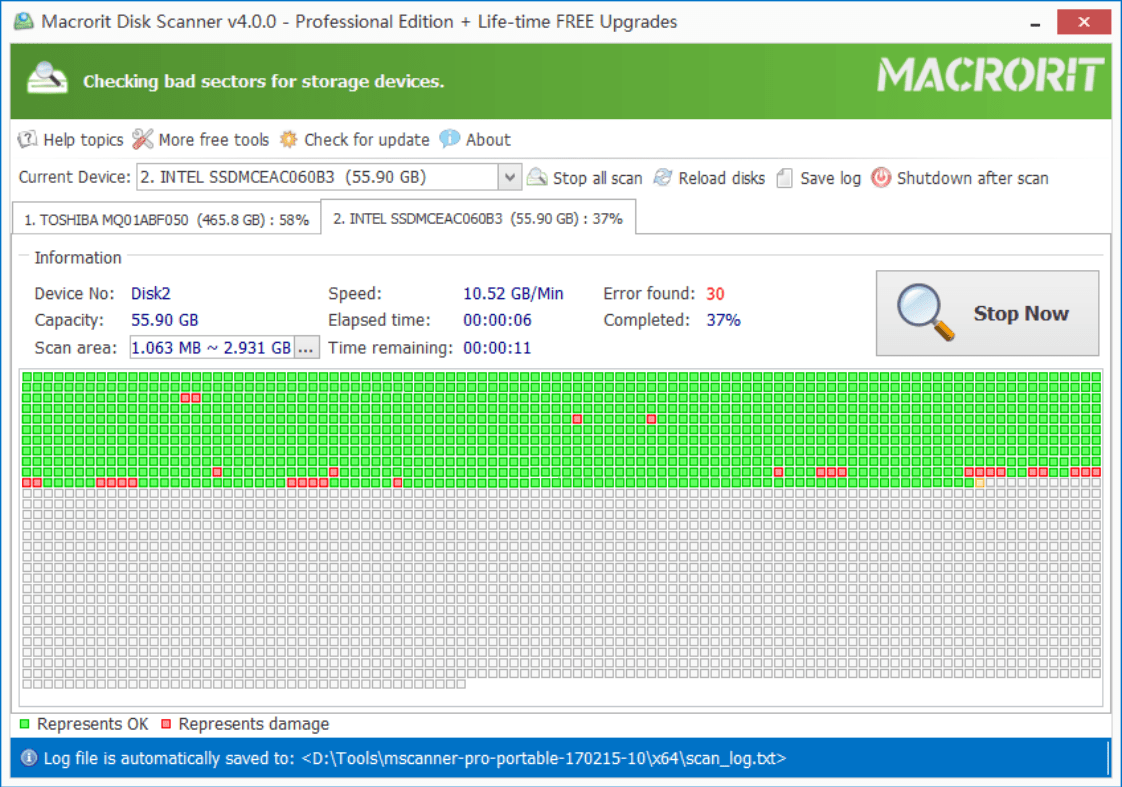
Interfaz De Macrorit Disk Scanner Professional Mostrando El Panel De Escaneo Y El Estado De Salud Del Disco
Scan overview: Quick interpretation to take action.

How to get the promotion (free license)

Follow these steps to download Macrorit Disk Scanner Professional Edition and activate the license with the included key.

1

Download the program (installable and portable)

Access the download link and choose the version you prefer. If you want to try without installing, use the laptop.

2

Opens the “Activate” menu within the program

Once you open Macrorit Disk Scanner, locate the optionEnablein the software menu.

3

Enter the activation key

Copy and paste the next key as it appears. Make sure you don't add extra spaces.

3FEB78D22422330B263B0C4554F42FE760BE99AB9087D4

Tip: If activation fails, check that you are using theversion 7.1.0(according to the terms of the offer).

Terms and conditions of the offer

Important information so you know exactly what this license includes.

  • Lifetime leavefrom Macrorit Disk Scanner Pro only fordomestic use (non-commercial).
  • No free updatesa more recent versions.
  • The licence is valid only for theversion 7.1.0.
  • No free technical supportavailable.

Note: When using disk diagnostic tools, it is best to have up-to-date backup, especially if you suspect physical failures or damaged sectors.

Frequently Asked Questions (FAQ)

Clear answers to resolve common doubts before downloading or activating.

Macrorit Disk Scanner Pro repairs damaged sectors?
It is mainly a tool ofdetection and diagnosis. If you find faulty sectors, the most important thing isback upand consider replacing the disk if the bugs increase.
Does it work for SSD and HDD?
Yeah, you can use it to analyze.HDDandSSD. In SSD, the goal is usually to identify abnormal behaviors or inconsistent readings, and in HDD, detect wear and defective sectors.
What version should I use for this license?
According to the terms, the license applies to theversion 7.1.0and does not include free updates to later versions.
Is the license for commercial use?
No. This offer indicates that the license is only fordomestic use (non-commercial).
What do I do if the scan shows errors?
Prioritizes aimmediate backupIf errors are repeated or increased, it is advisable to migrate to a new drive. A disk with damaged sectors can get worse over time.
  • Cómo Detectar Sectores Dañados En Windows Con Macrorit Disk Scanner
  • Cómo Detectar Sectores Dañados En Windows Con Macrorit Disk Scanner
  • Cómo Detectar Sectores Dañados En Windows Con Macrorit Disk Scanner

Me gusta esto:

Subscribe
Notify of

Este sitio usa Akismet para reducir el spam. Aprende cómo se procesan los datos de tus comentarios.

0 Comments
Most Voted
Newest Oldest

RELATED POSTS

View all

view all