

Everything you need to know about Hard Disk Sentinel
febrero 5, 2025 | by Equipo YKCG
Índice del Articulo
Introduction to Hard Disk Sentinel
Hard Disk Sentinel is an advanced software designed for monitoring andanalysis of hard drives and solid state drives (SSD).Its main objective is to assess the state of health of storage devices, which is essential to prevent data loss and ensure the correct functioning of the equipment. With an accessible interface, the software allows users to obtain detailed information about the performance, temperature, and overall status of their disks.
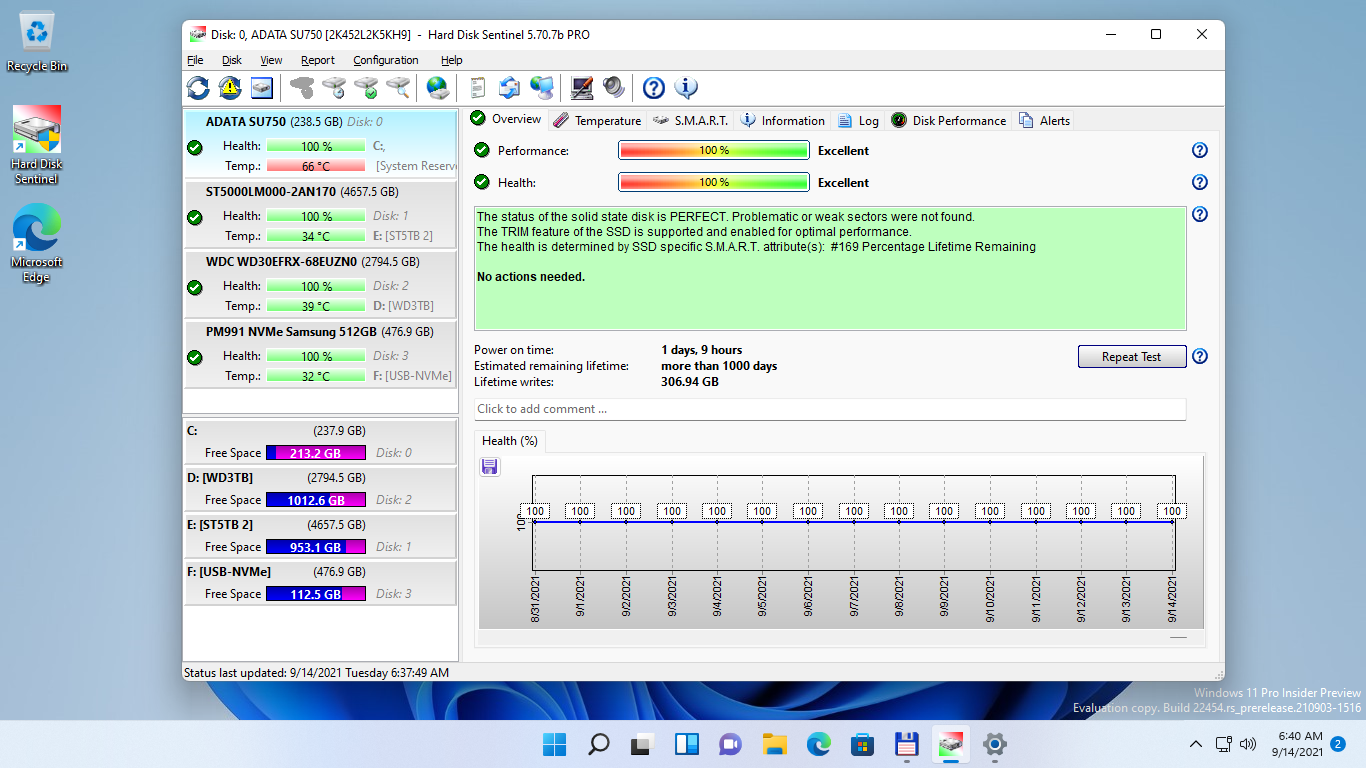
Among the key features of Hard Disk Sentinel is its ability to detect problems before they become catastrophic failures. It provides real-time alerts, allowing users to take preventive measures. This tool is especially valuable for those who handle large volumes of information or rely on their systems for daily operations, as any inconvenience with disks can affect productivity.
The origin of Hard Disk Sentinel goes back to the need for efficient software that allows users to monitor the state of storage media. Throughout its development, it has evolved to include continuous improvements in error detection and analysis, as well as optimization of disk performance. In addition, its relevance in themaintenance of computer equipmenthas increased as the amount of data stored and technology dependence have grown in recent decades.
By using Hard Disk Sentinel, users can have greater confidence in the integrity of their disks, which not only allows savings in data recovery costs, but also contributes to more efficient management of time and resources. Ultimately, this software is presented as an essential tool for the preventive maintenance of modern storage systems.

Main Features of Hard Disk Sentinel
Hard Disk Sentinel is an advanced tool designed to monitor the health and performance of hard drives and storage devices. One of its most prominent features is the ability to assess the health of the disk in real time. Using SMART technology (Self-Monitoring, Analysis, and Reporting Technology), this application provides a detailed analysis of the physical and functional condition of the disks, allowing users to identify potential problems before they become irreparable failures.
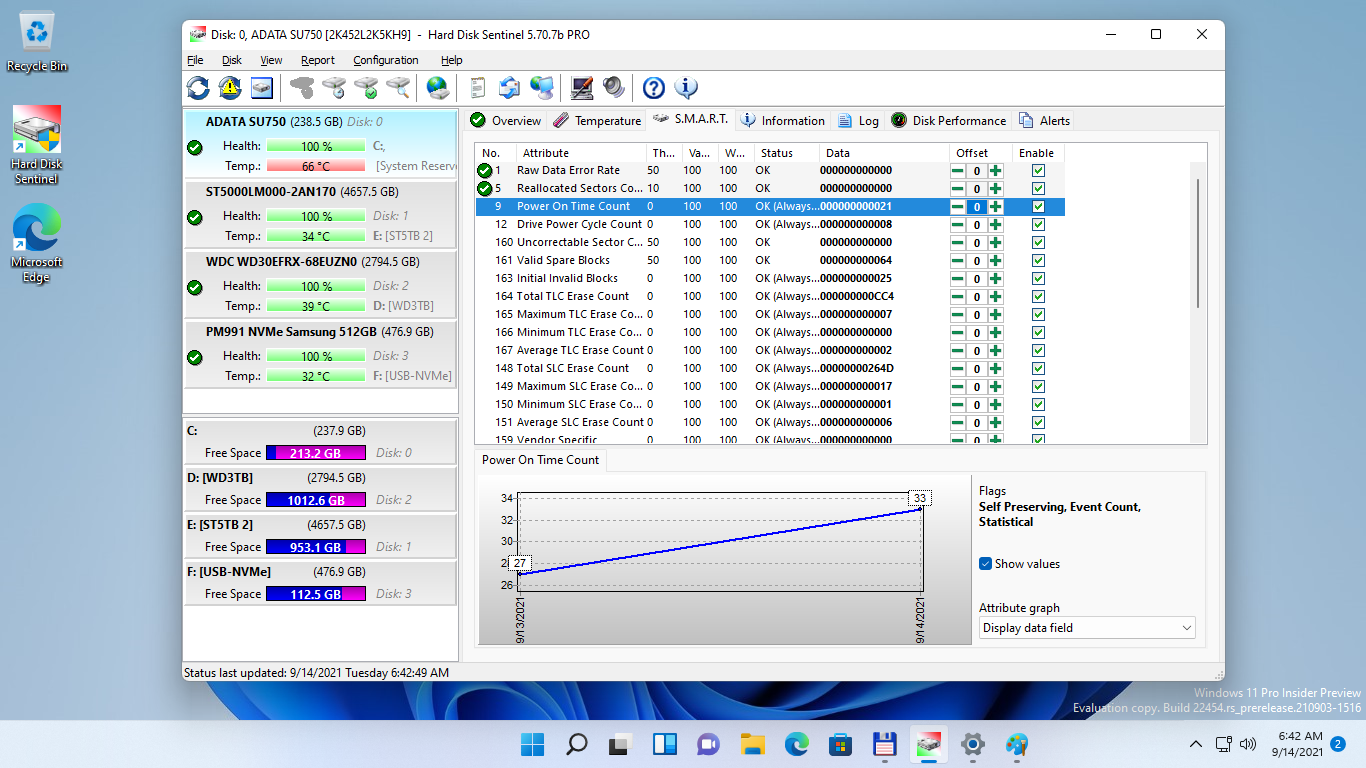
The monitoring of the temperature of the disk is another key function of Hard Disk Sentinel. Hard drives operate better at optimal temperatures; therefore, the tool provides alerts in case the temperature exceeds the recommended levels. This not only helps to prolong the service life of the hardware, but also guarantees optimal performance. In addition, the software records temperatures over time, allowing users to track trends and make informed decisions about the maintenance of their equipment.
Performance evaluation is another vital aspect that Hard Disk Sentinel manages. The tool gives users the ability to run speed tests, allowing them to detect performance falls that could indicate an imminent problem. Tests can be programmed or executed manually, providing flexibility in device performance management.

Finally, Hard Disk Sentinel offers various data display options that facilitate the understanding of disk status. From intuitive graphics to detailed reports, users can easily access the information needed to maintain effective control and anticipate possible failures. All of this makes Hard Disk Sentinel a complete solution for hard disk management and monitoring.
Benefits of Using Hard Disk Sentinel
Hard Disk Sentinel is positioned as an essential tool for managing and maintaining hard drives. One of the most outstanding benefits of using this software is preventing data loss. Through continuous monitoring of the health status of disks, Hard Disk Sentinel allows users to identify problems before they become catastrophic failures. This early detection capability is crucial, particularly in environments where information is valuable and their loss can result in significant consequences.
Another important aspect is the functionality of early bug notifications. Hard Disk Sentinel sends instant alerts when it detects a deterioration in disk health, allowing users to take proactive steps to back up important data before loss occurs. This feature not only provides peace of mind, but also facilitates rapid intervention that can save valuable time and resources in data restoration.
Additionally, the use of Hard Disk Sentinel can have a positive impact on the lifetime of the hardware. By maintaining constant monitoring of temperatures and performance of hard drives, the software helps users detect conditions that could cause premature wear. Users have reported that, after implementing this software, they have noticed an improvement in the performance of their disks, thus prolonging their service life.
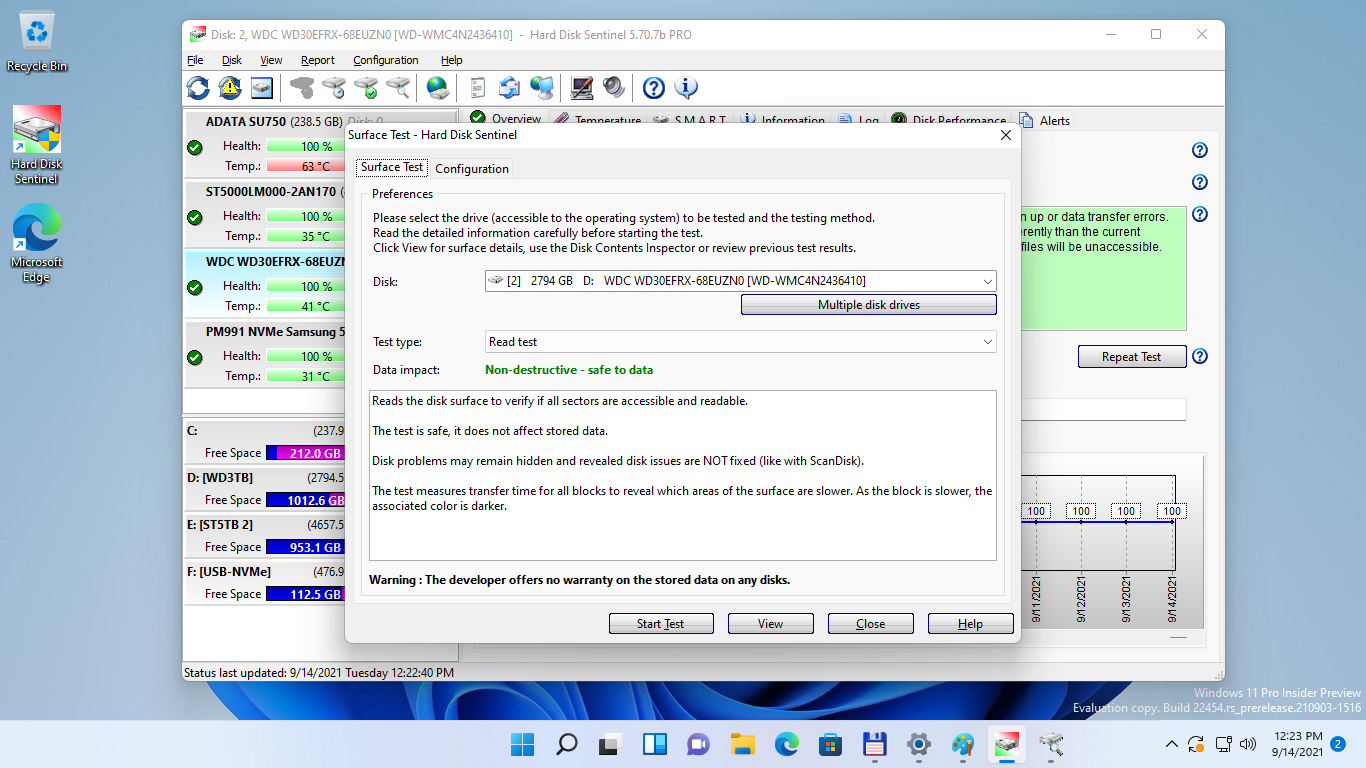
User and professional testimonials have highlighted the effectiveness of Hard Disk Sentinel in its day to day. Many value the intuitive interface that allows monitoring the state of multiple disks in one place, as well as the speed with which the software adapts to different hardware configurations. In short, Hard Disk Sentinel not only represents a tool for monitoring, but a comprehensive solution to ensure data integrity and optimize investment in hardware.

How to Install and Configure Hard Disk Sentinel
Installing and configuring Hard Disk Sentinel is a relatively simple process that allows users to monitor the health and performance of their hard drives. Below are the steps needed for successful installation.
First, it is important to make sure your system meets the minimum requirements. Hard Disk Sentinel supports Windows versions, and usually needs at least 1 GB of RAM and 50 MB free disk space. Check that your computer is up to date and can run monitoring applications smoothly.
Once you have confirmed that your system meets the requirements, head to the official Hard Disk Sentinel website to download the installation file. The available installation file is light and should not take long to complete. After downloading, locate the file on your computer and start the installation process by double clicking on it. An assistant will appear that will guide you through the steps necessary to complete the installation.
During installation, it is possible to customize some options, such as installation of shortcuts and integration with the Windows context menu. Once installation is completed, open Hard Disk Sentinel for the first time. When you start, the software will perform an initial analysis of the hard drives connected to the machine.
The configuration of the program can be modified through the options menu. It is recommended that users customize the alerts they want to receive, as well as the frequency of status checks. This allows for more effective monitoring of the health of the hard disk over time. In addition, it is suggested to explore the various functions that Hard Disk Sentinel offers, such as detailed reports, maintenance suggestions and diagnostic tools, which will optimize your experience of use.
Free license from Hard Disk Sentinel
Get alife-long leaveforHard Disk Sentinel Standard EditionTotally.FreeThis is your opportunity to monitor and optimize the status of your hard drive at no cost.
Steps to get it:
- Download and install the program from the following link. It is pre-activated:
Prices:
- Regular price:
$33.00 USD - Offer price: $0.00 USD
Terms and conditions of the offer:
- License valid only for the version6.10.0.
- It does not include free updates to future versions.
- No free technical support available.
- Exclusive use fornon-commercial purposes.
Take advantage of this limited-time offer!
RELATED POSTS
View all


Ashampoo Home Design 7: Free License For Life
noviembre 20, 2022 | by Equipo YKCG
IObit Smart Defrag Pro 8211; Original and free license at 2022
agosto 3, 2021 | by Equipo YKCG

Driver Booster 12 Pro Key – License + Free Updates
julio 29, 2025 | by Equipo YKCG