

Ashampoo WinOptimizer 18: System Optimization!
junio 8, 2022 | by Equipo YKCG
Índice del Articulo
Optimization of the system that takes your PC to the next level
One for all: Perfect for Windows 7, Windows 8 and Windows 10!
Windows is good, but it could be better.Ashampoo®WinOptimizer takes care of that! Operating systems tend to slow down over time, suffer from errors and fill up with junk files. In many cases, essential settings are missing or buried deep in the system. And then there is the threat to privacy, as especially Windows 10 loves to call home.
System optimization, thorough cleaning and diagnosis in a single program!
- Control boards to keep data up to date and instant access to functions
- A new defragmenter without a noticeable drop in performance
- Merge all free disk space with Defrag
- Extensive drive analysis and hardware review with Defrag
- A practical reference centre for greater clarity and faster access to testing.
- Improved system details view with optimized hardware detection
- Updated all cleaners
- Microsoft Edge Chromium full support
- New algorithm in Internet Cleaner to improve detection of browsing trails
- Improved Browser Extensions Administrator
- More details about hardware installed during system analysis
- Faster module start times
- Detailed records of analyses
The fast path to a better Windows!
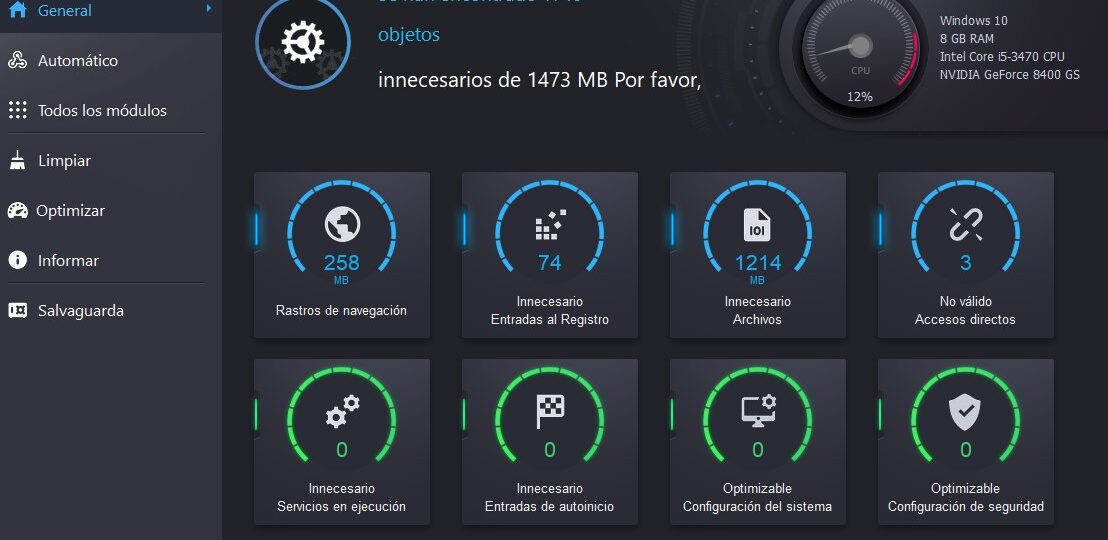
You can feel Ashampoo® WinOptimizer’s incredible power of optimization from the start! Take care of all eight major troubleshooting areas of Windows with one click and get the system running. Get rid of junk data, such as browsing trails, fix Registry errors, remove broken shortcuts and disable unnecessary services. WinOptimizer is your performance, security and stability booster with one click! Optimize your security, system and auto-start settings in one click! Recover system resources and enjoy faster start times and a smoother overall experience in Windows thanks to increased memory availability. Naturally, all features are ready for the future and for the latest Windows updates.
New: Overview of the scoreboard
The dashboards are the fastest way to get a detailed picture of your system and instantly access the essential functions. "Clean, optimize and report" always give the latest details of these vital tasks, including access to all functions! It is no longer necessary to manually open the modules to have a complete view! You will find valuable details such as status updates in your Register, dubious services or threats to privacy, all presented in an orderly fashion. Once you detect an area that requires action, a single click will take you directly to the affected module. Experience a new and better way to navigate Ashampoo® WinOptimizer!
The 21st century defragmentation tool
WinOptimizer 18 marks the end of the old Defrag module and the beginning of a new era! No more system slowdowns, thanks to smart background processing! The new Defrag is based on the already available algorithm of Windows and takes it to the fullest! Merge the free space to shorten access times, automate the analysis and defragmentation of the drive and make the process run in the background with low priority for uninterrupted use of your PC. The new defragmenter is prepared for SSDs: Retrim ensures that its unit is used at its maximum capacity, while ensuring high performance and long service life!
Fresh out of our development team: Our new cleaners!
The cleaners built into our WinOptimizer product line are fan favorites. That’s why we never stop improving them! The version is the first that supports the new Microsoft Edge Chromium. Internet Cleaner now uses a new algorithm to detect junk files more efficiently and in all browser-related save locations. It recovers precious disk space and uses our new cleaners to remove browsing traces, redundant files and registry errors! All functions are instantly accessible via the "Clean" dashboard!
All system parameters at a glance
Ashampoo® WinOptimizer provides a broad view of what is going on in your system, including your units. Once health parameters get worse, you will be instantly notified to avoid disaster. Discover bottlenecks and possible bugs, and detect possible improvements with incredible ease. Track resource hoarders, find out all about installed hardware and monitor all background processes that are running. It can't be easier! You can also easily access this area of the program through the "Inform" control panel.
The Swiss knife for your PC
Ashampoo® WinOptimizer 18 goes far beyond a simple tuning and cleaning process. It comes with a total of 37 powerful modules. From maintaining security to protecting privacy and smart system analytics, WinOptimizer is the complete package for you. Do you need to recover accidentally deleted files, permanently delete sensitive data or put a muzzle to Windows 10 telemetry functions? All of that is part of the package! All modules are reconditioned and updated every year for better compatibility and performance with current and future Windows updates. No other system optimization software comes close to this huge set of features, utility and easy handling!
Save time and effort automatically
A total of three automatic functions remove the main job from your shoulders! Self-cleaning not only frees up your junk data system, but also reduces the mess before it occurs. As soon as you close your browser, or another application, this fully automatic broom sweeps away everything that doesn't belong to your drives. Live Tuner provides an intelligent launch boost to all applications and allows custom fine tuning to assign different priorities to individual applications, for example, "high" for higher performance. Game Booster does exactly what its name indicates: Closes unnecessary background processes not essential to the game while it is running and restarts them when it finishes playing so that it can get back to work.
Continuous evolution with Windows updates
Windows is in continuous evolution, thanks to updates, and so is Ashampoo® WinOptimizer! Our development team works hard to ensure good performance before and after all Windows updates. Windows 10 received more than a dozen updates last year and we analyzed each one meticulously. Continuous program updates ensure that your WinOptimizer stays up to date with Windows, regardless of change. This includes repairing errors introduced through Windows updates, as WinOptimizer not only cleans your PC but also repairs it.
Say no to unwanted browser extensions
Browsers are not only your window to the Internet, but they are also threatened by malicious extensions that cause slowdowns or spy on you. You are likely familiar with toolbars, but you are likely to be much less familiar with the numerous extensions that can live in your browser, which offer little or no use but threaten performance and privacy. Many even manage to stay hidden from the lists of extensions installed in browsers! Browser Extension Manager puts an end to this. List all extensions installed in your browser and give you the option to remove them, if necessary. With a single click you can remove a malicious extension from your browser and make browsing a little safer.
Maximum security and privacy guaranteed!
Windows keeps collecting too much data about you and offers false compromises in terms of security. Windows 10 especially likes to call home. Win10's Privacy Control and Antispy returns you total control of your system! You decide which passwords are stored, which telemetry data are sent to Redmond and which photos you prefer to save for you. And make sure you don't facilitate unwanted geolocation, custom ads or meddling programs.
A fascinating vision of a hidden world with ADS Scanner
Have you heard about alternative data streams? This feature allows programs to attach hidden information to files as they appear in Windows Explorer, for example, to determine whether a file has been downloaded or is part of the system. Unfortunately, this feature can also be used abusively to attach malware to files. ADS Scanner detects and enumerates alternative data streams to help you locate and remove dubious entries!
Create maintenance plans in seconds and then just run and forget.
Many of our customers love One-Click-Optimizer, as well as the many other "System Maintenance" tools. They help you find browsing traces, hidden data junk, superfluous entries in the Register and system settings that need to be adjusted. Our handy task planner allows you to perform any of these functions at customized intervals and fully automatically. Keep your PC fit and healthy in the easiest way!


To get a license follow these steps
- Create an account on the Ashampoo page.
- Download Ashampoo WinOptimizer 18.
- Install on your PC, at the end of the installation you will be asked for Ashampoo account data.
- Log in, activation will be done automatically.
| Ashampoo WinOptimizer 18 | Ashampoo WinOptimizer 18 |
|---|---|
| Download link 1: | Download Ashampoo WinOptimizer 18 |
| Download link 2: | Download Ashampoo WinOptimizer 18 |
To get a license follow these steps
- Create an account on the Ashampoo page.
- Go to the promotion page.
- Enter your email address and click on ‘Ask for full version key’.
- Here you can pass two cases:
1. You will request to verify your email account.
2. Request to log in. - Download and install WinOptimizer 18.
- Enable by using your account or by entering the license code obtained.
| Ashampoo WinOptimizer 18 | Ashampoo WinOptimizer 18 |
|---|---|
| Link to create an account: | Click here to create an account |
| Promotional link: | Click here to go to the promotion |
| Download link 3: | Download Ashampoo WinOptimizer 18 |

Terms and conditions
- Lifetime license for personal use.
- It does not include free updates.
- It does not include free technical support.
RELATED POSTS
View all

Kaspersky Total Security 2022 8211; Free Extended License
julio 31, 2022 | by Equipo YKCG
Ashampoo WinOptimizer 2023 >=8211; Windows Optimizer
enero 13, 2023 | by Equipo YKCG
IObit Smart Defrag Pro 8211; Original and free license at 2022
agosto 3, 2021 | by Equipo YKCG