

UPDATE POST,CLICK HERE
Ashampoo Core Tuner 2
Ashampoo Core Tuner 2 - Lifetime license
FUNCTIONS
- Optimum use and administration of up to 8 processor cores.
- Automatic and manual allocation of cores and priorities.
- Regulated and perfectly structured administration of all settings.
Profile Management for the creation of own profiles with the following functions: - Close open browsers (supports all recognized browsers).
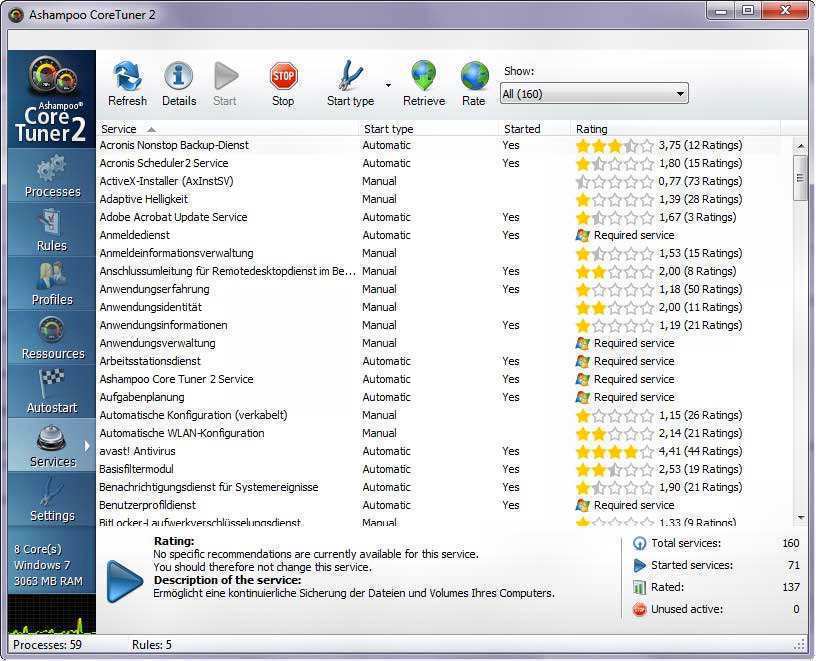
- Start or stop services including recommendations to evaluate.
- Completely automatic completion of running processes.
- Predefined profiles for individual adjustment or simple use.
- Instant use of profiles in a few clicks.
- Optimized start of focused applications to the allocation of the computing power.
- Administration of self-initiation entries and services including valuations.
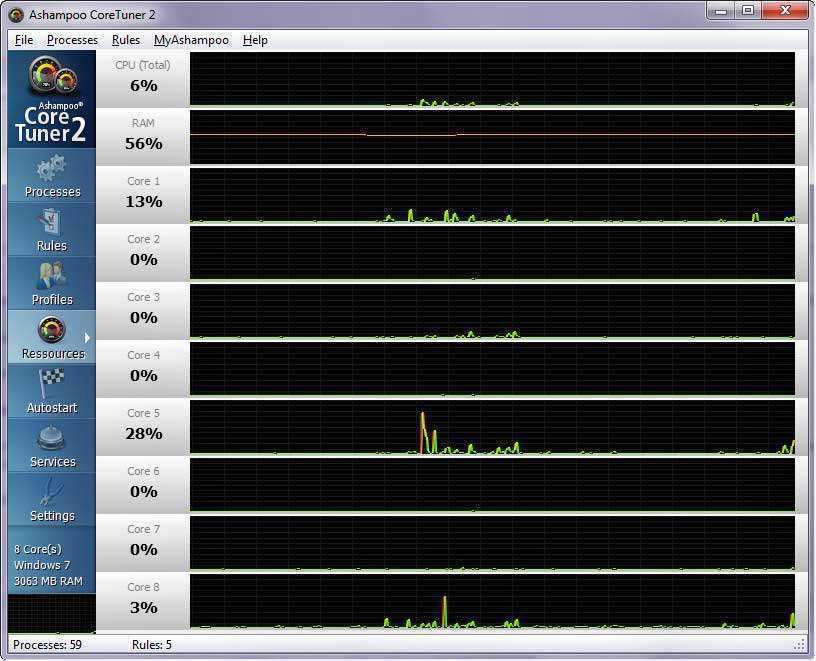
- Visual presentation of the capacity of all processors as well as processes
- New user interface more intuitive.
Increased power with performance optimization and management
With its revised user interface, the administration of 8 state-of-the-art processors and the new
Profile management, Ashampoo Core Tuner 2 is presented as a top-notch program to optimize
the calculation power available on PCs.
Processes
With Ashampoo Core Tuner 2 get an overview of all active processes. You can adjust the priority (six
levels) of processing that each program uses. In addition, you can determine how many processors
available you can use a program. With the “boost” function you are automatically assigned the highest priority to
selected program, as well as all available processors are activated.
Rules
When values are set to a program, a rule is automatically created. It can be used to undo each
one of the settings. Existing rules apply automatically at each start. At any time you can
edit or delete.
Profiles
The new profile management allows the user to create their own profiles. A profile may contain
various actions, e.g. completion of running processes or browser, as well as start or stop
of a service. Different profiles can be created for different purposes. As an example, a
profile for games. This profile for all Windows services that are not needed while playing.
Resources
In the live view you can see the performance of your processors and what the system load and memory is. More
still, the page displays a thumbnail view with the system load updated at all times.
Autostart
The list of autostart entries shows all applications that start automatically when running Windows.
Autostart inputs are often created without any priority. After that they are run permanently in
Background, wasting memory capabilities and valuable calculus power. Ashampoo Core Tuner 2
allows you to disable or delete tickets, if they are not necessary. In addition, all tickets can be evaluated online.
assessments, are automatically synchronized with those of other users to make it easier to decide if it is necessary
a self-initiation entrance.
Services
This module contains a list of all services that Windows starts automatically, even if they are not needed.
Ashampoo Core Tuner 2 allows you to close services. Online rating helps. A few stars show that
most users do not need a certain service and that can be closed, in order to have a greater
memory capacity and greater processor performance. To help other users you can also do your
online evaluation of services.
Live Tuner
If you decide to use the Live Tuner integrated in Ashampoo Core Tuner 2, you will work quietly in the background.
When an application is started, the Live Tuner ensures that the application will be accelerated over a period of
time or that the priority of the application will be increased. In this way, resources are focused on those applications.
REQUIREMENTS
Operating System:
Windows® XP, Windows Vista®(32bit/64bit) and Windows® 7 (32bit/64bit).
PC:
Any PC where one of the above operating systems runs at a reasonable speed.
Main Memory (RAM):
The size of the main memory is insignificant for the use of this program. We refer to the recommendations
of the operating system in use made by Microsoft.
Hard Disk Space:
30 MB for program files plus additional space for profile files (minimum).
Free license Ashampoo Core Tuner 2
To get the license free, follow these steps:
- Download Ashampoo Core Tuner 2 version 2.01 (received by mail).
- Go to "get a full version" or during installation, select the "free activation key Get".
- Register and enter the received license key.
Terms andconditions
- It does not include free technical support.
- It does not include the possibility of updating to future versions.
- The program is designed for personal use only.




Subscribe
0 Comments
Most Voted
RELATED POSTS
View all


Ashampoo Undeleter: Powerful File Recoverer Key
noviembre 27, 2021 | by Equipo YKCG

Free Online TV with onlineTV 18 License Key Giveaways
diciembre 4, 2022 | by Equipo YKCG

AnyMP4 Video Converter Ultimate: Video Converter and Editor
enero 16, 2026 | by Equipo YKCG