

AnyMP4 Video Converter for free: official license for 1 year + complete guide
febrero 13, 2026 | by Equipo YKCG
Índice del Articulo
AnyMP4 Video Converter: converts, improves and edits uncomplicated videos (guide + official promotion)
AnyMP4 Video Converteris a tool forconvert video and audio, optimize formats and apply quick edits (cut, adjust, improve quality) without entering a heavy professional editor.
For who it is:content creators, low-end laptop/PC users who want quick conversions, players who edit clips, and anyone who needs format support (MP4, MOV, MKV, MP3, etc.) on Windows.
Updated today:conditions, activation steps and recommendations for safe use in Windows.
Official captures (click to enlarge)
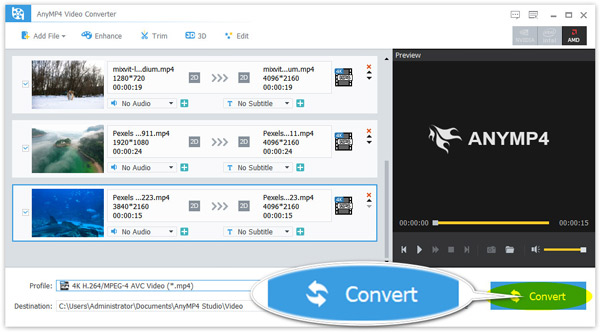
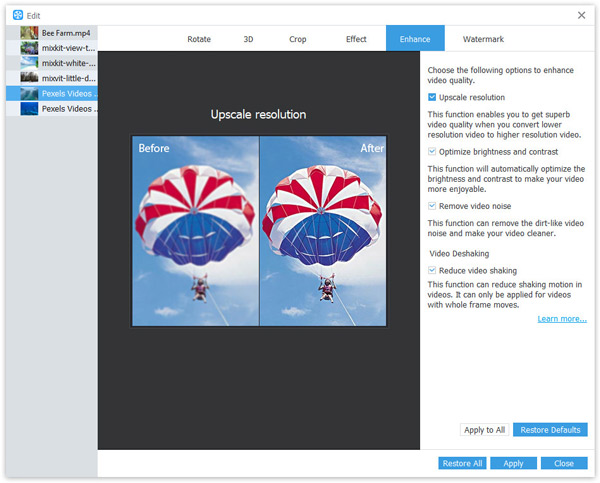
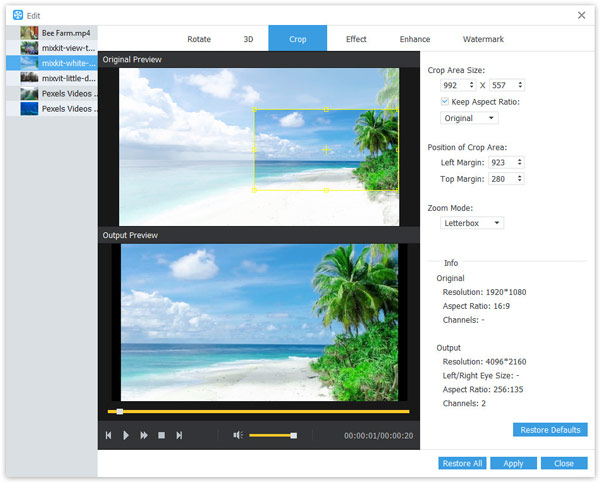
When you click, the image opens in full size in a new tab.
What does and doesn’t do AnyMP4 Video Converter (honest)
What I KNOW is right.
- Convert formatsfrom video/audio to common options (e.g. MP4, MOV, MKV, MP3, AAC).
- Optimize compatibilityfor devices and platforms (ideal if a video “does not open”).
- Quick Edit: trim, adjust resolution/bitrate, cut segments, rotate, etc.
- Basic improvements: quality adjustments, sharpness/clarity (depending on the material).
- Practical processesfor users who don't want a heavy professional editor.
What you should NOT expect
- It does not replace a professional editor with advanced timeline (DaVinci/Adobe, etc.).
- No “convert” a bad video into real 4K: improvement can belimitedAccording to the source.
- It does not guarantee that a corrupt file will be fixed only by converting.
- The promotional offer hasrestrictions(version, support and use).
Technical note:the “end quality” depends on codec, bitrate, resolution and the original file. Converting does not always improve; sometimes onlychanges compatibilityor reduces weight.
How to use it correctly (clear and safe steps)
- Download the installerfrom the official link and complete the installation.
- Import your file(video or audio) dragging it into the program.
- Choose the output format(example: MP4 H.264 for maximum compatibility).
- Optional:adjust resolution/bitrate if you are looking for less weight or better stability.
- Use quick cropping/editingif you need to remove parts or adapt the frame.
- Convertand review the result before deleting the original file.
Good practices:keep a copy of the original. If you’re going to “improve quality”, try first with a short clip to validate results and process time.
• Recommended configuration (by scenarios/hardware)
| Scenario | Practical recommendation |
|---|---|
| PC low range / laptop | Converts toMP4 (H.264)at 1080p and moderate bitrate. Avoid heavy filters and test with short clips. |
| Players (clips) | Cut the highlight, export in MP4 H.264, audio AAC. Keep 60 FPS only if your source is already 60 FPS. |
| Share via WhatsApp / networks | Reduces resolution to 720p or adjusts bitrate for less weight. Check that the audio remains in AAC stereo. |
| “Unopened” Files | Converts to MP4 H.264 and audio AAC. If it continues to fail, the file may be corrupted (other tool is convenient). |
Expected results (without promising miracles)
- Increased compatibility when playing on Windows, TV or mobile (depending on selected format).
- Lighter files if you adjust bitrate/resolution with criteria.
- Fast editing to crop clips and prepare content for sharing.
- “Perceptible” improvements in some cases, especially if the original video has margin (not always).
Technical reality:no tool can create real detail if it does not exist in the original file; what it can do is optimize output, reduce noise, rescale and improve sharpness moderately.
Requirements and compatibility
- System:Windows (as offered, license for Windows)
- Recommended:Modern CPU and enough disk space for conversions
- Connection:required to apply for license and download
Official promotion: how to get your license (step by step)
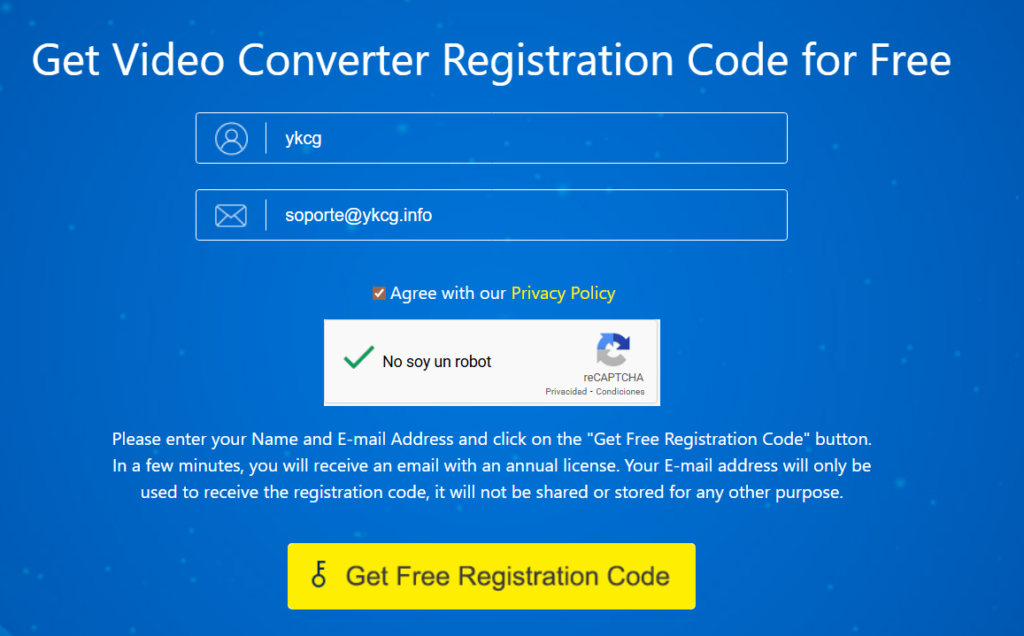
If you want to try all the functions ofAnyMP4 Video ConverterYou can apply for your license by following these official steps:
- Access the promotion pageand locate the form.
- Complete the formand request your code with the buttonGet Free Registration Code.
- Check your mail(including spam/unwanted folder) to receive the license.
- Download and installthe program since the promotion.
- Activewith the code received and unlock the complete functions.
Terms of the offer (important)
- Free License forWindowsduring1 year(version only7.2.58).
- No free updates to future versions.
- There is no free technical support.
- Just forpersonal use(non-commercial).
Editorial recommendation:save the mail with the license and take capture of the terms in case you need to consult them later.
Alternatives (and when other)
- HandBrake (free):excellent for MP4/H.264 with fine control, ideal for compression.
- FFmpeg (advanced):if you need to automate batch conversions from console.
- Adobe Media Encoder / DaVinci:if you already work with professional editing and complex export flows.
- Online fast converters:only for small and non-sensitive files (privacy).
• Frequently Asked Questions (FAQ)
AnyMP4 Video Converter is used to convert MP4 to MP3?
Yes. You can extract audio and export it as MP3 or other common formats, depending on your needs.
Does the quality of real video improve?
It can get better.in a limited wayaccording to the material. If the original video is very compressed, the jump can be minimal.
What format do you recommend for maximum compatibility?
In most cases:MP4 (H.264) + AAC audioIt's the most compatible standard.
Does the free license include support or updates?
No. According to the terms, it does not include free technical support or updates to future versions.
Is the offer for Mac too?
The promotion indicated is forWindowsand has specific version and duration conditions.
Can I use it for work/commercial?
No. The offer indicated is forpersonal use (non-commercial).
How do I avoid losing my license in the mail?
Save the email, mark as important and make a copy in secure notes (without posting the code).
Recommended internal links (YKCG)
Want more official promotions and useful guides?
Join Telegram: @YKCG2We post ads, steps, and updates without spam.
Editorial transparency + legal discharge
Editorial transparency:There is no affiliation or collaboration (none). This content is informative and seeks to help get the promotion from the official source and use the software safely.
Disclaimer:the availability and conditions of the promotion may change without notice. Always check the terms on the provider's site before activating or installing.
Last update: 12/02/2026
RELATED POSTS
View all


StreamFab OnlyFans Downloader: Download Content from OnlyFans
octubre 16, 2023 | by Equipo YKCG
Donemax DMclone: Clona Your Hard Disk in Minutes
octubre 29, 2022 | by Equipo YKCG

MiniTool ShadowMaker Pro 4.8: Free License
junio 18, 2026 | by Equipo YKCG