

Aiseesoft MobieSync on Windows: Features and Benefits
enero 5, 2025 | by Equipo YKCG

Índice del Articulo
Introduction to Aiseesoft MobieSync
AiseesoftMobieSync is positioned as an innovative tool in the field of data management of mobile devices and computers. Its main purpose is to facilitate the synchronization and transfer of files between different devices, thus optimizing the user experience by mobilizing crucial information. This application supports a wide variety of operating systems, including iOS and Android, making it a versatile solution for those who use different devices in their day-to-day lives.
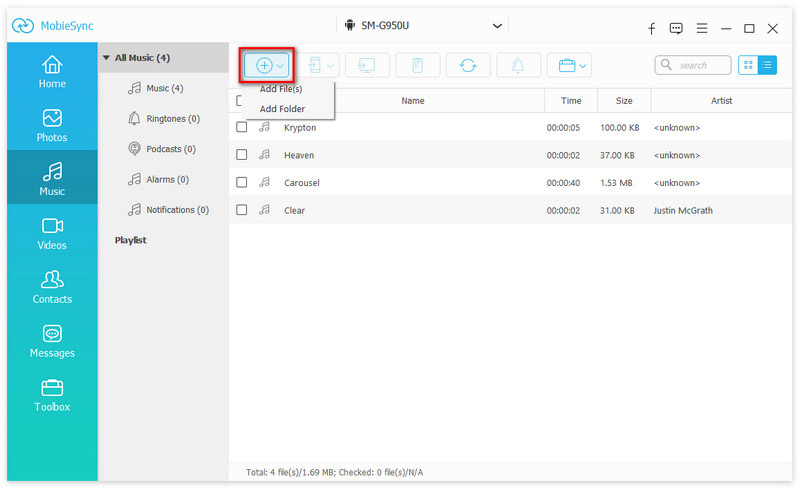
One of the most outstanding features ofAiseesoftMobieSync is your ability to handle different types of files, such as photos, videos, music and contacts. This allows users to manage their digital content effectively without the need to use multiple applications. The program interface is intuitive and friendly, making it easy to navigate and perform transfer tasks smoothly. With just a few clicks, users can sync their content and make sure that all their information is kept up to date on all their devices.
In addition,AiseesoftMobieSync offers advanced features for data backup and restoration, thus contributing to the security and preservation of valuable information. In its version for Windows, users can enjoy greater speed and efficiency, allowing them to make massive data transfers in less time. All this translates into a significant saving of time and effort, which is an important benefit for those who need to manage large amounts of information frequently.

Technical Characteristics of Aisesoft MobieSync
AiseesoftMobieSync for Windows stands out for a variety of technical features that favor the efficient management of mobile devices and their interaction with computers. One of its most relevant functions is the transfer of files between devices. This software allows users to move photos, music, videos and documents from one device to another quickly and effortlessly, which is essential to keep content up to date and accessible.
Another important aspect is data synchronization. Aiseesoft MobieSync facilitates the synchronization of contacts, calendars and other key information, ensuring that users have consistent data on all their devices. This function is particularly useful for those who manage multiple devices, as it ensures that the information is always up to date.
The software also offers robust contact management, allowing users to organize, edit and back up their contacts intuitively. This functionality is invaluable for those who need to consolidate their communication networks and ensure that important details are not lost. In addition, the backup and data restoration option is essential. Aiseesoft MobieSync allows users to back up their information and restore them in case of loss, which provides peace of mind in the face of technical accidents or failures.
Finally, the conversion of media into Aiseesoft MobieSync allows users to convert media files to different formats, making it easier to support different devices. Together, these technical features not only optimize data handling, but also contribute to a more fluid and satisfying user experience in the Windows environment.

Benefits of Using Aiseesoft MobieSync for Windows
Aiseesoft MobieSync is a powerful tool for data management on mobile devices that stands out for offering multiple benefits to Windows users. One of the highlights of this software is its ease of use. The intuitive interface allows users, regardless of their technical level, to perform seamless data transfers. Clear menus and simple instructions guide users through the process, minimizing the learning curve. This accessibility is a crucial factor contributing to the popularity of the program.
Another significant benefit of Aiseesoft MobieSync is the speed of data transfer. With advanced technology, users can move files from one device to another in a matter of minutes. This is especially useful for those who need to transfer large amounts of data, such as photos, videos or documents. Transfer speed ensures that users do not waste time, allowing them to focus on more important tasks.
Security is also a priority with Aiseesoft MobieSync. The program uses advanced encryption to manage sensitive information, giving users the peace of mind that their data is protected during transfers. This is of paramount importance in a world where personal data management is increasingly critical.
Finally, Aiseesoft MobieSync significantly improves the efficiency in organizing media files and contacts. The ability to synchronize and manage information across multiple devices allows users to keep their information always up to date and accessible. According to user testimonials, many have found that their ability to organize files has improved significantly since the implementation of this software. In conclusion, Aisesoft MobieSync presents a comprehensive solution that encompasses ease of use, security, speed and efficiency in data management.
Conclusions and recommendations
In short, Aiseesoft MobieSync is presented as an exceptional tool for managing mobile devices on Windows. Throughout this article, we have highlighted several outstanding features that make this application a valuable option for both beginners and those with more advanced needs. Its intuitive interface and full functionality make it a resource accessible to all.
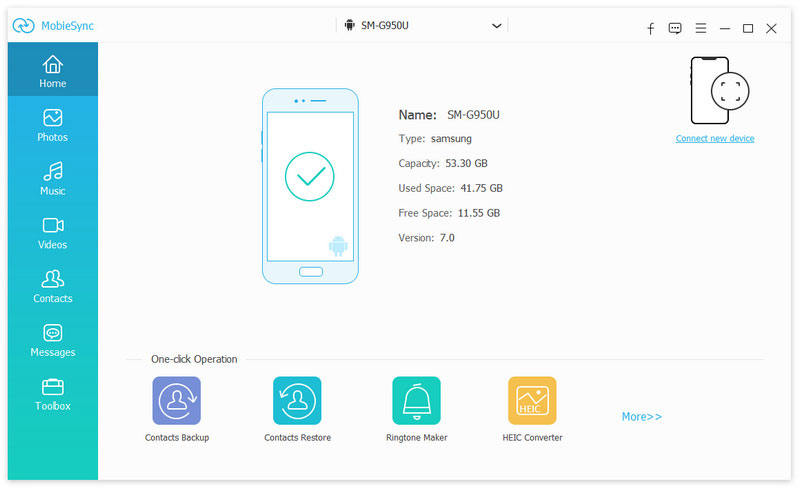
Considering the various capabilities of Aiseesoft MobieSync, it is clear that it meets the needs of a wide range of users. For those seeking basic file management, the ability to synchronize contacts, photos and music is highly efficient. At the same time, those who require advanced functionalities, such as selective data transfer between different devices and the ability to create backups, will also find that the software meets their requirements.
We strongly recommend that users take advantage of the trial version of Aiseesoft MobieSync before making a purchase. This will allow them to experience first-hand the functionality of the software and discover how they can improve their device management experience. By exploring different features, users will be able to evaluate which tools are most useful to their particular situation.
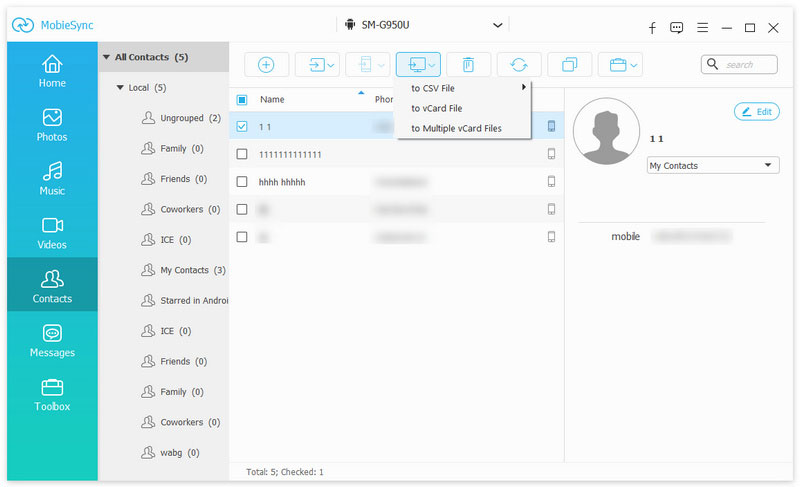
Finally, you should not underestimate the power of Aiseesoft MobieSync in the area of personal and professional organization. Given its versatility, it is suitable for individuals who want to keep their data organized as well as professionals who depend on efficient management of their devices. In conclusion, MobieSync is a solid option for anyone looking to optimize the management of their mobile devices. Its wide variety of functions presents an opportunity that is worth considering.
Get your Free Aiseesoft MobieSync License
Follow these simple steps to get your free license:
- VisitPromotional Page.
- Complete the form and press the button"Registrierungscode seden".
- Receive your license in your email.
- Download and install the software from the official site.
- Activate your license with the code received.
Details of the Offer
Regular price:€31.23
Price during the offer: €0.00
Terms and Conditions
- You get a free 1-year license from Aiseesoft MobieSync for 1 Windows PC.
- Free updates to new versions are available during the license period.
- Free technical support is not available.
- The product is designed for domestic, non-commercial use.

RELATED POSTS
View all

BoostSpeed 12 Pro Full: Windows Optimizer in one click
diciembre 16, 2022 | by Equipo YKCG

AmoyShare DiReec Screen Recorder: Record Screen and Audio Free
julio 17, 2024 | by Equipo YKCG

MiniTool ShadowMaker Pro 4.8: Free License
junio 18, 2026 | by Equipo YKCG